RavenPrompts
Home

Find your category

Create and communicate

  • Photography and image
  • Videos
  • Social media
  • Content creation
  • Marketing

Business and organisation

  • Sales
  • Business
  • Finance
  • Productivity

Learn and develop

  • Education
  • Programming

Life and leisure

  • Food
  • Sports
  • Travel
View all categories →
Prompt libraryFavoritesBlogPricingSuggest a prompt
← Back to the blog
Article

Tracking unpaid invoices with AI and a balance you can check

Work through partial payments, a duplicate record and an unidentified receipt while keeping the supporting documents in view.

RavenPrompts editorial team · November 9, 2026

Start with two lists and a cutoff date

The invoice PDF shows what you billed. The bank statement shows movements. To see what remains, link the two and choose a cutoff date. List each invoice with its issuer, reference, currency, total and due date. Keep a separate list of payments with dates, amounts, currencies and supporting references.

Work on a copy. If you want to test a chat tool, use fictional figures or an authorised sample with the references replaced. You can design the sheet with made-up figures and fill it in within your own workspace.

The €360 invoice

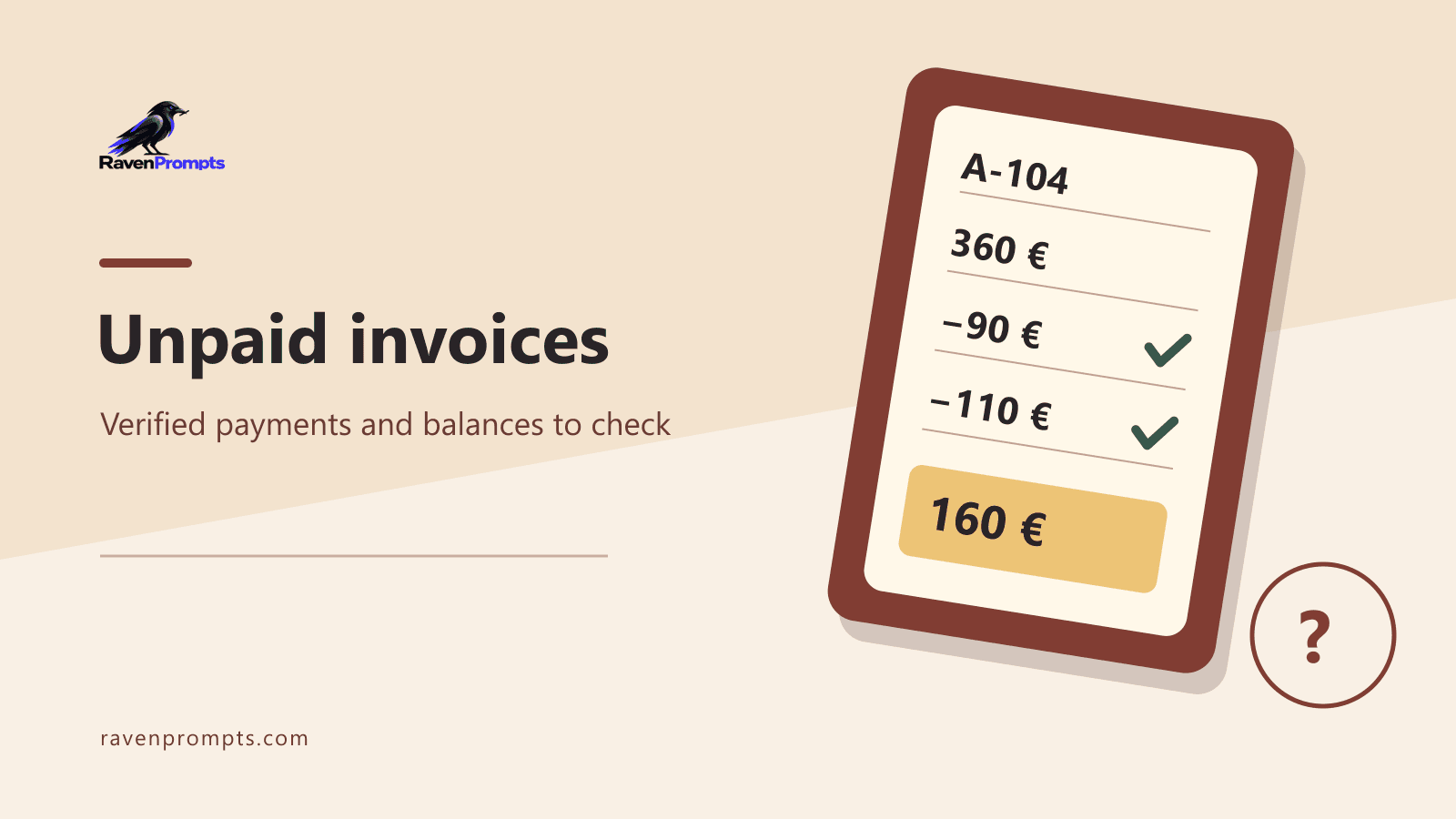
In this fictional case, invoice A-104 totals €360 and is due on 5 November. At the close of 6 November there are two linked receipts, P01 for €90 and P02 for €110. P02 appears in both the bank statement and the internal record. They document one payment, so the €110 goes into the total once.

A third receipt, P03, is for €160 and has no invoice reference. The balance based on the verified payments is €360 − €90 − €110 = €160. The matching amount makes P03 a candidate for review. If the supporting record later links it to A-104, the balance in this example becomes zero.

What to ask AI for

Try this instruction. “Prepare one row per invoice using only these two lists. Include the reference, due date, total, verified payments with their IDs, the balance and the next check. Group entries for the same transaction and retain both sources. List unlinked payments separately and say what evidence would resolve each one.”

Add a counterexample. Two customers might both pay €160 on the same day. You still need another reference to tell the payments apart. Ask for that ambiguity to be flagged and treat the result as a review draft.

Check the balance before you write

Open A-104 and check the total, currency and due date. Find P01 and P02 in the supporting records, check that each identifier appears once in the sum and trace P03 to its original entry. If your business uses several invoice series, match on issuer, series, number and currency to distinguish similar references.

Keep due dates and reconciliation in separate fields. The due date says when the payment was expected. Reconciliation records the movements you could link. An invoice can be overdue with a receipt still to check. Record the cutoff and who will handle that check.

When a spreadsheet is enough

A spreadsheet can be enough when the references are clean. Use a conditional sum to include only movements with the correct key and verified status. Check that the payment table has one row per receipt first. A formula will add both rows if a duplicate is still there.

If you already invoice through accounting software, use its reconciliation as the primary record. Some systems let you link a bank movement to an existing entry. Accept a match when you can point to the evidence that shows they describe the same payment.

Microsoft’s guide to conditional sums ↗

Intuit documentation on matching transactions ↗

Leave a clear next step

For A-104, a useful note reads “€360 billed · €200 matched · €160 balance from verified receipts · P03 to reconcile · check the reference before contacting the customer.” If you draft an email, confirm the amount first and give the customer room to clarify a recent payment.

The catalogue prompt can help you prepare the review. The final check is whether someone else can open the same records, reproduce the sum and see why a receipt is still open.

Prepare your follow-up for unpaid invoices ↗

Frequently asked questions

Can I mark an invoice paid when a receipt matches its balance?

Keep it as a possible match until the supporting document or payment reference identifies the transaction.

What if one payment covers two invoices?

Keep one payment ID and record the amount allocated to each invoice once you have evidence. Check that the allocations add up to the receipt.

Do I need to upload invoices?

Ask for a template using fictional figures and fill in a local copy. Check what your organisation permits before sharing real data.

In this article

01Start with two lists and a cutoff date02The €360 invoice03What to ask AI for04Check the balance before you write05When a spreadsheet is enough06Leave a clear next step

Your map of AI tools

ChatGPT↗Claude↗Gemini↗

Independent editorial content. RavenPrompts is not affiliated with or endorsed by these tools.

RavenPrompts

You know which AI to choose. Now put it to work.

Find a RavenPrompts prompt you can adapt to your task and take to your AI tool.

Browse the prompt library ↗View pricing

Related reading

Comparison

Compare two options with AI: spot what is missing before you choose

A tidy table is not enough to make a decision. Learn to compare two desks against your space and budget limits, without mistaking missing information for an advantage.

Read article ↗
Article

From a voice note to clear writing with AI: start by talking

When you know what you want to say but struggle to write it, try saying it aloud first. Learn to check the dictated text and turn it into a clear message without adding promises or losing details.

Read article ↗
Article

An AI training diary: organise your notes without making up data

Turn your post-workout notes into a record you can check easily. A simple example of keeping repetitions and minutes separate, leaving missing details blank and reviewing the AI’s answer.

Read article ↗
Article

How to check a date with AI before you share it

A screenshot says the workshop has moved. Before forwarding it, find the original notice and check which year it refers to. AI can help you work out where to look.

Read article ↗
Article

Plan a games afternoon with AI in a small flat

Five people, a 90 cm table and an hour to play. See how to ask an AI chat for a plan that fits your space and adjust it if the group changes.

Read article ↗
Article

How to fix an AI reply without starting over

When an AI reply goes off track, point out what to keep, which detail to fix and what the next draft should look like. Here's how that works with a book swap poster.

Read article ↗
Article

How to reschedule an appointment with AI and confirm the new time

A worked example for offering two real slots, checking the time zone and keeping one calendar invitation once the change is agreed.

Read article ↗
Article

Your CV with AI: clearer, without inventing a different life

A useful CV explains what you can do. AI can help organise and review it; the experience, dates and decisions remain yours.

Read article ↗
Article

Before you paste text into AI, check which details it needs

Use a print quote to separate job requirements from private details, ask for a draft with placeholders and check it before you send it.

Read article ↗
Article

Duplicates in Excel: what to check before deleting a row

A nine-row case for choosing a record key, separating repeated data from conflicting amounts, and giving AI a review you can verify.

Read article ↗
Article

Your first AI chat, from rough notes to an email you can check

Start with a real task in ChatGPT. Draft a request for a quote, spot an invented commitment and fix it with a follow-up.

Read article ↗
Article

An AI study plan that fits your actual week

A science example for balancing explanation, practice and review, narrowing the goal when time is short and checking what you have learnt against your course material.

Read article ↗
Article

What is an AI prompt? Simple examples to get started

A prompt is what you ask an AI to do. That part is simple. The interesting bit is explaining what you need without writing a novel or learning a new vocabulary.

Read article ↗
Article

A thousand photos, no folders: getting organised with help from AI

Choose a way to find your memories, try it on ten photos and keep control of what you share. You can ask for ideas without handing over your gallery.

Read article ↗
Article

Gemini and your documents: check before sharing

A packing list for a day out is a simple way to understand the update: the content comes first, then the file.

Read article ↗
Article

The meeting is over. What happens to all those notes?

Granola, Fathom and Otter are changing what we expect from a summary: finding agreements, following a project’s thread and bringing a little more context to the next conversation.

Read article ↗
Article

With so many AI tools, choosing one has become a task of its own

Finding a source, understanding notes, imagining an image and giving a text a voice are different jobs. Looking beyond the familiar names helps explain where each tool might fit.

Read article ↗
Comparison

ChatGPT, Claude and Gemini: three ways to develop an idea

The choice changes when a conversation becomes a document, an ongoing project or a task spread across emails and files.

Read article ↗
Questions and answers

When an idea becomes an image, a voice or a song

AI brings the first version of an idea closer, opening new questions about its meaning, its origins and where it will end up.

Read article ↗
RavenPrompts

Prompts to create, learn and work better with artificial intelligence.

Find your next great prompt.

Follow us

  • Instagram
  • X
  • YouTube

Explore

  • Home
  • Prompt library
  • Blog
  • Free prompts
  • New prompts
  • Suggest a prompt
  • All categories
  • My favorites

Categories

  • Marketing
  • Social media
  • Productivity
  • Programming
  • Education
  • Photography and image
  • Travel

RavenPrompts PRO

  • Plans and pricing
  • My account and purchases

Help and contact

  • Frequently asked questions
  • Contact us
  • Purchase terms
  • Legal notice
  • Privacy
  • Cookie policy

© 2026 RavenPrompts. All rights reserved.

Made to take your ideas further.

Your cookies, your choice

We use necessary cookies for access, security and remembering preferences. You can allow speed measurement and visitor analytics separately. We do not use advertising cookies or cross-site tracking. You can also allow Metricool visitor measurement separately. Cookie policy

Cookie settings

Each optional measurement requires your permission. Earlier choices do not authorise the new visitor analytics. You can withdraw either permission at any time. Metricool is off by default. Your earlier Vercel permissions do not enable it.

They allow sign-in, protect forms and save your choices. Your language is remembered when you select it.

Always active

With your permission, Vercel Speed Insights measures loading, responsiveness and visual stability on some public pages. It does not collect prompts you enter or form contents.

Optional · off by default

With your permission, standard Vercel Web Analytics counts visits to public pages and provides aggregate device, browser and country statistics. We do not send searches, forms or prompts.

Optional · off by default

With your permission, Metricool counts visits to public routes and estimates the country from the IP address. We send no searches, forms, prompts or referring pages.

Optional · off by default

We do not use cookies or pixels to personalise ads or track your activity across sites.

Not currently used

We remember this choice for one year in this browser. You can change it at any time using the cookie button or the footer.

Cookie policy
Home
Prompt library
Blog
Free prompts
New prompts
Suggest a prompt
All categories
My favorites
Marketing
Social media
Productivity
Programming
Education
Photography and image
Travel
Plans and pricing
My account and purchases
Frequently asked questions
Contact us
Purchase terms